
Roblox Arasaka Academy Guide: Cyberware, Combat & School Life
Enroll in Night City's premier corporate academy: master R6 combat stances, install high-grade cyberware, scan rivals with cyber-optics, and dominate the campus.
Player quick start
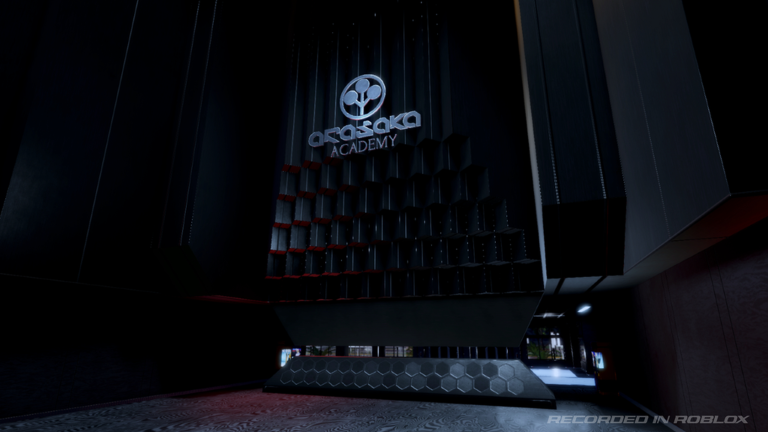
- Initialize Your Edgerunner & Enter the Academy: Spawn into the sleek corporate campus of Arasaka Academy in Night City. Familiarize yourself with basic locomotion, sprinting (Shift), and dashing (Q) to navigate corporate plazas and academic halls.
- Activate Your Fighting Stance (T) & Basic Melee: Toggle your combat stance using T. Practice light and heavy attack combinations, timing your block and parry against student rivals or practice dummies to build tactical stamina.
- Test Launch Codes & Earn Your First Eddies: Open your Menu (M) or Phone (P) to test candidate codes like RELEASE and 1KLIKES, collecting bonus starting funds and cyberware upgrade components.
- Engage the Scanner (Tab) for Targets & Intel: Hold Tab to activate your cyber-optic scanner overlay. Scan classmates, security drones, and interactive terminals to identify bounties, tech specs, and side objectives.
- Equip & Trigger Cyberware Implants (Z / X / C): Visit a campus tech vendor to install nervous system and body implants. Bind active modules to Z, X, and C for high-speed sandevistan bursts or devastating heavy strikes.
Reported Arasaka Academy codes & reward notes
Arasaka Academy features an in-game redemption system accessible via the Menu (M) and Phone (P). The developers at Ordinance Games announced official reward codes at like milestones, beginning with the 1K likes target. Below are the reported candidate codes tracked by the community.
Checked 2026-10-02
Free starting Eurodollars and tech supplies
Redeem via the in-game Menu (M) or Phone (P) code redemption field.
Source: Public launch tester report
Bonus tech fragments and currency pack
Check availability in the in-game Menu or Phone interface.
Source: Developer milestone announcement in description
Cosmetic item token or cash boost
Test in the Menu settings panel before expiration.
Source: Community player discussion
Free implant calibration materials
Test in the Menu settings panel before expiration.
Source: Community player discussion
Recommended 30-Minute Progression Route
A structured step-by-step roadmap from initial academy orientation and code redemption to scanner recon, combat drills, and your first cyberware upgrade.
Orientation & Code Redemption (0 to 5 Minutes)
Explore the spawn plaza, open Phone (P) and Menu (M), and apply launch candidate codes for starting eddies.
Combat Stance & Melee Drills (5 to 10 Minutes)
Press T to enter fighting stance, practice Q dashing, and spar with training partners to learn R6 attack timing and block breaks.
Campus Reconnaissance with Scanner (10 to 18 Minutes)
Press Tab to scan NPCs and terminals across the academy courtyards, locating ripperdocs and student gig-givers.
First Cyberware Install & Trial (18 to 24 Minutes)
Purchase your first entry implant, bind it to Z/X/C, and test active activation in the combat courtyard.
Subjugation & Squad Formation (24 to 30 Minutes)
Take on your first student duel or campus mission, execute a clean B grip finish, and form a crew for team brawls.
Why it is rising
A high-octane Cyberpunk RPG that bridges the gap between anime school roleplay and punishing R6 melee combat with active cyberware abilities.
Roblox public statistics observed on 2026-10-03; values change over time.
No release or update freshness signal was recorded for this review.
Boasts over 1,850 upvotes with only 75 downvotes, demonstrating strong player retention and smooth netcode.
Combining fighting stance (T), dashing (Q), scanner (Tab), and cyberware keys (Z/X/C) provides deep skill-based depth.
Trend score timeline
Directional editorial signal, not a live Roblox ranking.
- Capitalizes on the enduring popularity of Cyberpunk: Edgerunners by delivering an immersive Arasaka corporate academy environment.
Nearby mechanic cluster
These adjacent games are grouped by shared mechanics and editorial similarity, not by official Roblox ranking.
Anime school life roleplay with hardcore R6 melee combat and smartphone UI, inspired by Classroom of the Elite.
Gritty, punishing urban combat game on Roblox known for high-stakes melee, firearms, and ruthless grip execution mechanics.
Hardcore action RPG featuring precision parrying, stance combat, and deep progression trees.
Core Gameplay Systems: Combat, Cyberware & Night City Roleplay
How Ordinance Games translates the dystopian tech of Cyberpunk into an engaging Roblox multiplayer loop.
R6 Combat Stance & Grip Subjugation
Toggle fighting stance with T and execute downed foes with B. Creator Takeaway: Responsive R6 combat creates visceral, readable hitboxes that favor skill over mindless button-mashing.
Cyberware Implants (Z / X / C)
Active abilities like sandevistan time-dilation and kinetic bursts. Creator Takeaway: Giving players dedicated skill keys with visual particle trails elevates melee combat into high-action spectacle.
Scanner HUD Overlay (Tab)
In-engine scanner revealing target threat levels and interactive electronics. Creator Takeaway: Environmental scanning reinforces the cybernetic roleplay fantasy without cluttering the baseline UI.
In-Game Phone & Terminal Economy (P)
Manage contacts, gigs, and financial balances via personal device. Creator Takeaway: Seamless in-world communication hubs keep players immersed in the lore rather than navigating static 2D menus.
Creator insight
The integration of the Tab scanner interface with R6 melee hit registration and mobile touch control compatibility.
Cyberpunk experiences on Roblox frequently fall into the trap of being passive visual showcases or sluggish walking simulators. Arasaka Academy captures an underserved audience craving high-intensity R6 combat inside a faithful Cyberpunk: Edgerunners academy setting.
Rather than generic medieval fantasy or standard shonen anime, this project introduces cyberware keybinds (Z/X/C), optic scanner modes (Tab), and brutal grip mechanics (B) in an elite corporate academy backdrop.
Imbalance between high-end cyberware and new players: If cybernetic speed enhancements or one-shot combos dominate without counter-play, onboarding will suffer; parry windows and cooldown tuning are vital.
Core MVP loop: A modular R6 stance combat template, a clean scanner shader overlay toggled via Tab, and three active cyberware slots triggered on cooldown.
FAQ
What is Arasaka Academy on Roblox and what inspired it?
Arasaka Academy is a cyberpunk action RPG developed by Ordinance Games (KarmaDX3, 4unkin, All_ForSause). Set in an elite corporate academy inspired by Cyberpunk: Edgerunners and Cyberpunk 2077, players navigate campus life, duel rivals using R6 combat, and install powerful cyberware.
What are the core controls and how do you enter combat stance?
Press T to toggle your fighting stance, Q to dash, Shift to sprint, B to grip/subjugate downed opponents, Tab to activate your cyberware scanner, P to open your phone, and M to access the main menu.
How do cyberware abilities work and which keys trigger them?
Cyberware implants grant active tactical powers such as speed bursts and heavy strikes. Once installed through tech vendors, active cyberware modules are bound to the Z, X, and C keys.
How do you redeem promo codes in Arasaka Academy?
Launch Arasaka Academy on Roblox, press M to open the menu or P to access your phone, locate the Codes section, enter the code exactly as written, and confirm to claim your rewards.
What does the Tab scanner do in Arasaka Academy?
Holding or toggling Tab activates a cybernetic visual HUD overlay. This allows you to scan surrounding students, security guards, and electronic terminals to reveal threat levels, tech specs, and available gigs.
What is the significance of the grip mechanic (B)?
When an opponent's health is depleted in combat, pressing B initiates a grip action to neutralize or execute them, securing combat mastery and preventing immediate recovery.
What devices are supported for Arasaka Academy?
Arasaka Academy is optimized for PC with custom keyboard keybinds, and also supports mobile and console players through adapted Roblox client control schemes.