
Dig & Clean Roblox Guide
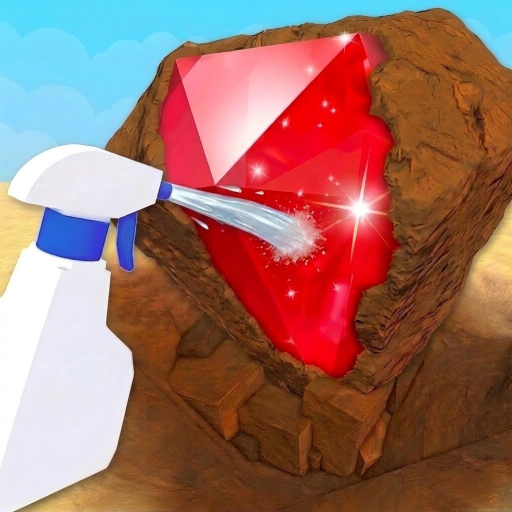
Dig & Clean is a Roblox simulation game where a simple loop does a lot of work: dig up dirty finds, spray them clean, decide what is worth keeping, display favorites in your museum, and reinvest into better shovels and spray bottles.
Player quick start
- Open the official Roblox listing: Launch from the Roblox page linked here and confirm the creator is Squeaky Clean! before using guide pages for gear or code claims.
- Complete one full loop before spending: Dig one dirty find, spray it clean, check what it is, then decide whether to sell it or save it for your museum.
- Upgrade the current bottleneck: If digging feels slow, consider shovel progress. If revealed finds pile up, focus on cleaning speed. If good spots are hard to find, review detector advice carefully.
- Protect first-copy museum value: Sell routine duplicates for cash, but keep rare or new finds when the museum goal matters more than immediate upgrade money.
- Be cautious with off-site shortcuts: Third-party pages discuss scripts, auto farming, and exact item routes. Treat those as non-official and stick to the normal dig-clean-upgrade loop.
Reported Dig & Clean codes & reward notes
Recent sources still report these five code candidates. Roblox Den and Nerdschalk include all five; Game.Guide omits UPDATE4, while Pocket Tactics also omits UPDATE1. Missing entries do not prove expiry. Rewards and redemption steps remain third-party reports, not officially verified results.
Checked 2026-09-28
Before redeeming anything
- Confirm you are on the Squeaky Clean! Dig & Clean Roblox page before trying any code.
- Finish the tutorial if the current client keeps the shop code field locked.
- Reported guides place the code field at the bottom of Shop on the left. Copy each code exactly; sources disagree about case sensitivity, so do not assume differently cased strings are interchangeable.
- Avoid slash-chat lists and codes from other Roblox digging games.
5 levels reported
Guides describe finishing the tutorial, opening Shop on the left, scrolling to the bottom and using the code field. Copy the code exactly and check the actual in-game response; acceptance and rewards are not guaranteed.
Source: Reported tracker
2x Luck for 30 minutes reported
Guides describe finishing the tutorial, opening Shop on the left, scrolling to the bottom and using the code field. Copy the code exactly and check the actual in-game response; acceptance and rewards are not guaranteed.
Source: Reported tracker
5 Instant Cleans reported
Guides describe finishing the tutorial, opening Shop on the left, scrolling to the bottom and using the code field. Copy the code exactly and check the actual in-game response; acceptance and rewards are not guaranteed.
Source: Reported tracker
2x Luck for 30 minutes reported
Guides describe finishing the tutorial, opening Shop on the left, scrolling to the bottom and using the code field. Copy the code exactly and check the actual in-game response; acceptance and rewards are not guaranteed.
Source: Reported tracker
10x Luck for 10 minutes reported
Guides describe finishing the tutorial, opening Shop on the left, scrolling to the bottom and using the code field. Copy the code exactly and check the actual in-game response; acceptance and rewards are not guaranteed.
Source: Reported tracker
First-session route for Dig & Clean
A good first session proves the whole cycle before optimization: find one dig spot, clean the result, choose sell or museum, then upgrade only the tool slowing your cycle.
Verify the right game
Confirm the Roblox title and Squeaky Clean! creator before applying any guide, since other digging games have different code lists and mechanics.
Dig one nearby find
Use the starter shovel to pull up a dirty item or buried treasure, then observe how long the dig step takes.
Spray it clean
Clean the find before judging value; the reveal moment is the main feedback loop.
Choose sell or display
Keep standout first copies for the museum and sell lower-value duplicates to fund tools.
Upgrade with a reason
Buy a better shovel, detector, or spray bottle based on your actual bottleneck instead of chasing every guide table at once.
Why it is rising
World Place reads the dig-clean-museum cycle as a clear progression hook: short actions reveal a find and lead to a sell, display or upgrade decision. This is design analysis, not proof of what caused player growth.
Roblox public statistics observed on 2026-09-29; values change over time.
The Roblox games API reported the latest update at recentlyT13:46:20.1638117Z; recheck the live client before relying on detailed rewards, maps, gear, or rarity timing.
No reliable public search or community signal was recorded for this review.
The official description connects digging, spray cleaning, rare finds, museum displays and better shovels or spray bottles.
Trend score timeline
Directional editorial signal, not a live Roblox ranking.
- World Place reads the game as a lesson in turning simple physical verbs into collection, upgrade, and museum identity pressure.
Nearby mechanic cluster
These adjacent games are grouped by shared mechanics and editorial similarity, not by official Roblox ranking.
Both turn a simple chore into a clear object-processing loop with collection and routing decisions.
A calm simulator comparison for players who like visible progress, collection, and upgrade loops.
A nearby digging-game comparison where code lists and mechanics must be kept separate from Dig & Clean.
Useful for comparing target discovery, collection decisions, and progression pressure.
Another unusual premise with a simple repeatable loop, useful for creators studying novelty-first simulator ideas.
A higher-pressure object extraction comparison where taking and processing items creates risk rather than calm discovery.
Mechanics to study in Dig & Clean
The loop works because each action has a clear before-and-after: buried becomes dirty, dirty becomes revealed, revealed becomes display or cash, and cash becomes stronger tools.
Core loop
Find a dig spot, dig up an unknown item, clean it, judge rarity or usefulness, then sell or display it before upgrading tools.
Retention hook
Rare-item hunting, museum completion, and tool upgrades give players short-term and long-term goals.
Social hook
Museums and rare finds make progress visible, while shared maps and contested dig spots can create light comparison pressure.
Progression pressure
Shovel, detector, and spray upgrades compete for early currency, so players need to identify the slowest part of their loop.
New-player readability
The official description explains the whole loop in a few verbs: dig, spray, hunt, show off, and buy better tools.
Update sensitivity
Gear names, tool prices, item rarity, map names, code claims, and best-upgrade advice can drift after updates.
Creator insight
Study how Dig & Clean chains tactile actions into a reveal economy: each step transforms the item state and gives the player a new decision.
A creator can explore other collection loops where cleaning, restoring, identifying, or appraising turns ordinary objects into upgrade fuel and display trophies.
Differentiate with richer museum curation, cooperative exhibits, clearer upgrade comparisons, rotating dig biomes, or item stories instead of only increasing rarity numbers.
If upgrades become opaque or rare finds feel too random, players may follow external tables instead of trusting in-game feedback; make tool tradeoffs visible.
Build one dig field, one reveal station, three item rarities, a sell/display choice, two tool upgrades, and a small museum wall that updates instantly.
FAQ
Is this Dig & Clean page official?
No. World Place is an independent game-guide site. Use the official Roblox experience and Squeaky Clean! group for the creator identity and announcements.
Who made Dig & Clean on Roblox?
The Roblox API lists the creator as Squeaky Clean!, group ID 679586291.
Are there verified Dig & Clean codes here?
No. UPDATE4, UPDATE3, UPDATE2, UPDATE1 and SECRET10 remain third-party candidates. Current lists differ, and the official description contains no code strings. Check acceptance and the actual reward in the game; no result is guaranteed.
Where do I redeem Dig & Clean codes?
Guides describe finishing the tutorial, opening Shop on the left and scrolling to the code field at the bottom. Copy the code exactly and follow the current in-game prompts. These steps are reported guidance; sources disagree about case sensitivity.
What kind of game is Dig & Clean?
It is a simulation and tycoon-style Roblox experience about digging up dirty finds, cleaning them, hunting rare items, displaying discoveries, and upgrading tools.
What should new players do first?
Complete one full dig, clean, sell or museum, and upgrade cycle before chasing rare-item guides or expensive gear routes.
Should I sell finds or keep them for the museum?
Keep standout first copies or rare discoveries when collection matters, and sell routine duplicates when you need cash for the tool slowing your loop.
What should I upgrade first?
Upgrade the bottleneck you can feel: shovel for slow digs, spray bottle for slow cleaning, or detector when finding good dig spots becomes the problem.
What can creators learn from Dig & Clean?
Creators can study how a simple reveal chain turns object discovery into collection, display, currency, and upgrade decisions.
Which similar Roblox games should I compare?
Compare Clean The Library for object-processing, Grow a Garden for calm simulator progression, and DIG for a separate digging-game benchmark.
How often should Dig & Clean claims be rechecked?
Recheck after Roblox title updates, code posts, Discord announcements, new maps, gear changes, item-rarity changes, and tracker conflicts such as UPDATE4 appearing in some lists but not others.